How can I add an "Add-on" to my reward?
To include an add-on item(s), select a reward and add the amount for the add-on item(s) to your pledge. Then send us a quick message letting us know what add-on(s) you selected.
If you’ve already submitted your pledge, you can edit the amount by going to “Backed Projects,” then “Edit Pledge” and then you can add the amount for the add-on item. Afterwards, send us a quick message letting us know what add-on(s) you selected.
PS. We’re using BackerKit to send out our post-campaign surveys, so you can still add additional gear/add-ons even after the campaign is over.
Last updated: June 06, 2017 09:58
When will the rewards ship?
We’re confident that we will have all rewards shipped out in October.
Last updated: June 06, 2017 09:58
How can I buy this gear in bulk?
Let’s talk! Send us a message and we’ll get back to you with details.
Last updated: June 06, 2017 09:58
What phones are compatible?
The Beastgrip Pro is compatible with most smartphones, including all iPhone, Samsung and Google Pixel models, as well as any phone that fits within the specs here: http://bit.ly/1jGjM0X
The Anamorphic Lens is designed for smartphones with a 28mm equivalent focal length or greater and the Wide Angle Lens is designed for smartphones with a 26mm equivalent focal length or greater. Using a phone with a wider focal length or a protective phone case may cause slight image quality degradation towards the edges of the frame when using these lenses.
Last updated: June 06, 2017 09:58
What is the DOF Adapter MK2?
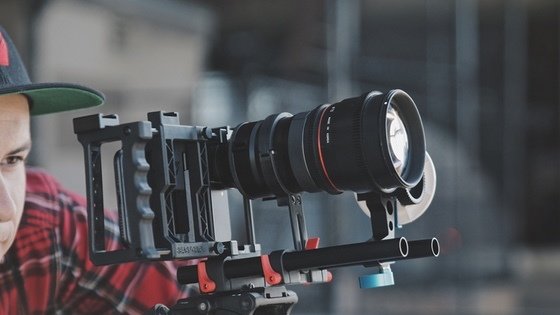
The DOF Adapter MK2 is an adapter that allows you to use an SLR/DSLR lens to your smartphone for an incredible bokeh, shallow depth-of-field and film-style look and the ability to pull focus manually like on professional cinema cameras.
Last updated: June 06, 2017 10:05
What lenses are compatible with the DOF Adapter MK2?
The DOF Adapter MK2 is compatible with a wide variety of SLR and DSLR lenses, just make sure that they meet the following requirements:
Full frame - the focusing screen inside the DOF Adapter MK2 is designed for full-frame lenses. Using a full-frame focusing screen offers the best performance and compatibility with the largest variety of lenses. Crop sensor lenses are not recommended, as they will cause extreme vignetting when used with the DOF Adapter MK2.
Canon EF Mount - the DOF Adapter MK2 uses a Canon EF Mount, so it can be used with Canon EF lenses, and a wide variety of other brands/mounts, such as Nikon F-mount, PL-mount, Pentax K-mount, M42, and Olympus OM-mount with an additional adapter ring.
Manual focus control and an open aperture - the most important aspect of the DOF Adapter MK2 is the ability to manually control focus and get a shallow depth-of-field. Since the DOF Adapter MK2 is purely mechanical, your lens has to have a manual mechanical focus control. Lenses like the Canon STM series that require an electronic connection to a camera body to focus are not compatible with the DOF Adapter MK2. Lenses that offer manual aperture control have to be set wide open for the most shallow depth-of-field. Lenses without a manual aperture control ring, like canon EF lenses, will usually already have their aperture wide open and are also compatible.
For the best results, we recommend using fast (f.95 - f2.8) SLR/DSLR lenses. Generally speaking, the faster the lens, the better performance the DOF Adapter MK2 will have.
Last updated: June 06, 2017 09:58
What's the difference between the original DOF Adapter and the DOF Adapter MK2?
We rebuilt the entire design from scratch and were able to dramatically improve the image quality and provide a simpler, more user-friendly experience.
To start things off, we used advanced, custom optical elements to increase the image quality, by practically eliminating vignetting/hotspotting, chromatic aberration and distortion. This also means that a much wider range of full-frame SLR/DSLR lenses, such as zoom lenses, are compatible with the DOF Adapter.* We then sealed off the focusing screen to eliminate any chance of user error or damage to it. Finally, we encased everything in a durable, black anodized aluminum shell with a rotating barrel that allows you to align the focusing screen and bayonet mount in one simple motion.
Last updated: June 06, 2017 09:58
What apps do you recommend to use with the DOF Adapter MK2?
Since the SLR/DSLR lens projects the image upside down when using the DOF Adapter MK2, we recommend using a third-party app to flip the image back to the normal orientation, such as FiLMiC Pro (Video - iOS and Android), ProCamera (Photo and Video - iOS), Filmakr (Video - iOS), MAVIS (Video - iOS), ProMovie (Video - iOS), Camera 645 Pro Mk 3 (Photo and Video - iOS) or Open Camera (Photo/Video - Android).
You can also use the DOF Adapter in your smartphone’s stock/native camera app with the image flipped upside down if you prefer.
Last updated: June 06, 2017 09:58
What is the BeastRail?
The BeastRail is a secure, all-in-one rail system, custom designed for the Beastgrip Pro and the DOF Adapter/DOF Adapter MK2, which allows you to firmly lock all of your gear in place for an even more stable shot and attach additional accessories like a follow focus and matte box.
Last updated: June 06, 2017 09:58
Is the BeastRail backwards compatible with the original Beastgrip/Beastgrip Pro?
Yes, the BeastRail is fully compatible with both the original Beastgrip and the Beastgrip Pro. Note that on the original Beastgrip, there is a slight difference in the depth of the grooves that the vertical rods of the lens mount go into, which creates a small amount of tension and causes the base (piece that holds your phone and slides horizontally) to have more resistance when sliding it.
Last updated: June 06, 2017 09:58
What is the Pro Series 1.33X Anamorphic Lens?
The Pro Series 1.33X Anamorphic Lens gives your images a classic, cinematic widescreen aspect ratio (2.4:1 for video and 16:9 for photos), dramatic perspective and creative, Hollywood-style lens flares.
*This lens is designed for smartphones with a 28mm equivalent focal length or greater and to be used without a protective case on your phone. Using a phone with a wider focal length or a protective phone case may cause slight image quality degradation towards the edges of the frame.
Last updated: June 06, 2017 10:09
What apps do you recommend to use with the Pro Series 1.33X Anamorphic Lens?
Since the Anamorphic Lens “squeezes” your image horizontally, you’ll either need to “de-squeeze” your footage during post-production if you’re shooting with your phone’s stock/native app or use one of the apps below to “de-squeeze” your footage in real-time while shooting your video:
FiLMiC Pro (Video - iOS and Android), MAVIS (Video - iOS), ProMovie (iOS), Guerrilla Filmmaker (iOS).
Last updated: June 06, 2017 09:58
What is the Pro Series Beastgrip x Kenko 0.75X Wide Angle Lens?
The Pro Series Beastgrip x Kenko 0.75X Wide Angle Lens is an advanced wide angle lens that provides edge-to-edge sharpness, zero distortion, zero chromatic aberration* and a wider field of view.
*This lens is designed for smartphones with a 26mm equivalent focal length or greater. Using a phone with a wider focal length or a protective phone case may cause slight image quality degradation towards the edges of the frame.
Last updated: June 06, 2017 09:58
What is the Beastgrip Pro?
The Beastgrip Pro is the world’s first universal lens adapter and camera rig system for all smartphones. It allows you to attach professional camera accessories to your smartphone, such as an LED light, tripod, slider, microphone, etc. with a 1/4”-20 threaded mount or cold shoe mount for better production quality.
Last updated: June 06, 2017 10:05
What's the difference between the latest version of the Beastgrip Pro and the original Beastgrip/Beastgrip Pro?
All Beastgrip Pro models from this campaign include stainless steel hardware, solid aluminum thumbscrews, machined aluminum and glass-filled nylon components for increased reliability and durability, an all-new aluminum lens mount with a rubber interchangeable insert and upgraded lower clamp for full functionality with the iPhone 7 Plus and overall better performance with other phones, an additional aluminum cold shoe mount and an all-new lower arm for BeastRail compatibility and to add an additional tripod mount on the same axis as your lens.
Last updated: June 06, 2017 09:58
Can I add lens filters to the Beastgrip Pro and/or lenses?
Yes, you can use any 37mm lens filter directly onto the Beastgrip Pro, or a 58mm one with the Anamorphic or Wide Angle Lens. You can also add a lens filter to your SLR/DSLR lens when using the DOF Adapter MK2.
PS. Other sized lens filters (between 29mm - 52mm) can be used directly onto the Beastgrip Pro with a step up/step down ring (sold separately).
Last updated: June 06, 2017 10:05
Who is Beastgrip, Co.?
Beastgrip, Co. is an innovative hardware company dedicated to creating advanced mobile photography, filmmaking and live streaming equipment. In 2013, we just had an idea and a 3D printer and with the amazing support of Kickstarter we were able to introduce the world’s first universal smartphone lens adapter/rig system with a completely new and unique approach in design and functionality, which has since been awarded with a number of patents. We’ve been blessed to have been a part of some of the most groundbreaking videos ever shot on a smartphone, such as:
Bentley - “Intelligent Details,” and “Bespoke Driving Jacket”
National Geographic - “Wasfia”
Ghost Digital Cinema - “MALTO”
Edward Sharpe & The Magnetic Zeros -“No Love Like Yours”
Sven Dreesbach - “This Moment”
Boat Magazine - “Of Land & Sea”
Last updated: June 06, 2017 10:06
How can I add an “Add-on” to my reward?
To include an add-on item(s), select a reward and add the amount for the add-on item(s) to your pledge. Then send us a quick message letting us know what add-on(s) you selected. If you’ve already submitted your pledge, you can edit the amount by going to “Backed Projects,” then “Edit Pledge” and then you can add the amount for the add-on item. Afterwards, send us a quick message letting us know what add-on(s) you selected. PS. We’re using BackerKit to send out our post-campaign surveys, so you can still add additional gear/add-ons even after the campaign is over. Last updated: Tue, Jun 6 2017 12:58 pm EDT
When will the rewards ship?
We’re confident that we will have all rewards shipped out in October. Last updated: Tue, Jun 6 2017 12:58 pm EDT
How can I buy this gear in bulk?
Let’s talk! Send us a message and we’ll get back to you with details. Last updated: Tue, Jun 6 2017 12:58 pm EDT
What phones are compatible?
The Beastgrip Pro is compatible with most smartphones, including all iPhone, Samsung and Google Pixel models, as well as any phone that fits within the specs here: http://bit.ly/1jGjM0X The Anamorphic Lens is designed for smartphones with a 28mm equivalent focal length or greater and the Wide Angle Lens is designed for smartphones with a 26mm equivalent focal length or greater. Using a phone with a wider focal length or a protective phone case may cause slight image quality degradation towards the edges of the frame when using these lenses. Last updated: Tue, Jun 6 2017 12:58 pm EDT
What is the DOF Adapter MK2?
The DOF Adapter MK2 is an adapter that allows you to use an SLR/DSLR lens to your smartphone for an incredible bokeh, shallow depth-of-field and film-style look and the ability to pull focus manually like on professional cinema cameras. Last updated: Tue, Jun 6 2017 1:05 pm EDT
What lenses are compatible with the DOF Adapter MK2?
The DOF Adapter MK2 is compatible with a wide variety of SLR and DSLR lenses, just make sure that they meet the following requirements: Full frame - the focusing screen inside the DOF Adapter MK2 is designed for full-frame lenses. Using a full-frame focusing screen offers the best performance and compatibility with the largest variety of lenses. Crop sensor lenses are not recommended, as they will cause extreme vignetting when used with the DOF Adapter MK2. Canon EF Mount - the DOF Adapter MK2 uses a Canon EF Mount, so it can be used with Canon EF lenses, and a wide variety of other brands/mounts, such as Nikon F-mount, PL-mount, Pentax K-mount, M42, and Olympus OM-mount with an additional adapter ring. Manual focus control and an open aperture - the most important aspect of the DOF Adapter MK2 is the ability to manually control focus and get a shallow depth-of-field. Since the DOF Adapter MK2 is purely mechanical, your lens has to have a manual mechanical focus control. Lenses like the Canon STM series that require an electronic connection to a camera body to focus are not compatible with the DOF Adapter MK2. Lenses that offer manual aperture control have to be set wide open for the most shallow depth-of-field. Lenses without a manual aperture control ring, like canon EF lenses, will usually already have their aperture wide open and are also compatible. For the best results, we recommend using fast (f.95 - f2.8) SLR/DSLR lenses. Generally speaking, the faster the lens, the better performance the DOF Adapter MK2 will have. Last updated: Tue, Jun 6 2017 12:58 pm EDT
What’s the difference between the original DOF Adapter and the DOF Adapter MK2?
We rebuilt the entire design from scratch and were able to dramatically improve the image quality and provide a simpler, more user-friendly experience. To start things off, we used advanced, custom optical elements to increase the image quality, by practically eliminating vignetting/hotspotting, chromatic aberration and distortion. This also means that a much wider range of full-frame SLR/DSLR lenses, such as zoom lenses, are compatible with the DOF Adapter.* We then sealed off the focusing screen to eliminate any chance of user error or damage to it. Finally, we encased everything in a durable, black anodized aluminum shell with a rotating barrel that allows you to align the focusing screen and bayonet mount in one simple motion. Last updated: Tue, Jun 6 2017 12:58 pm EDT
What apps do you recommend to use with the DOF Adapter MK2?
Since the SLR/DSLR lens projects the image upside down when using the DOF Adapter MK2, we recommend using a third-party app to flip the image back to the normal orientation, such as FiLMiC Pro (Video - iOS and Android), ProCamera (Photo and Video - iOS), Filmakr (Video - iOS), MAVIS (Video - iOS), ProMovie (Video - iOS), Camera 645 Pro Mk 3 (Photo and Video - iOS) or Open Camera (Photo/Video - Android). You can also use the DOF Adapter in your smartphone’s stock/native camera app with the image flipped upside down if you prefer. Last updated: Tue, Jun 6 2017 12:58 pm EDT
What is the BeastRail?
The BeastRail is a secure, all-in-one rail system, custom designed for the Beastgrip Pro and the DOF Adapter/DOF Adapter MK2, which allows you to firmly lock all of your gear in place for an even more stable shot and attach additional accessories like a follow focus and matte box. Last updated: Tue, Jun 6 2017 12:58 pm EDT
Is the BeastRail backwards compatible with the original Beastgrip/Beastgrip Pro?
Yes, the BeastRail is fully compatible with both the original Beastgrip and the Beastgrip Pro. Note that on the original Beastgrip, there is a slight difference in the depth of the grooves that the vertical rods of the lens mount go into, which creates a small amount of tension and causes the base (piece that holds your phone and slides horizontally) to have more resistance when sliding it. Last updated: Tue, Jun 6 2017 12:58 pm EDT
What is the Pro Series 1.33X Anamorphic Lens?
The Pro Series 1.33X Anamorphic Lens gives your images a classic, cinematic widescreen aspect ratio (2.4:1 for video and 16:9 for photos), dramatic perspective and creative, Hollywood-style lens flares. *This lens is designed for smartphones with a 28mm equivalent focal length or greater and to be used without a protective case on your phone. Using a phone with a wider focal length or a protective phone case may cause slight image quality degradation towards the edges of the frame. Last updated: Tue, Jun 6 2017 1:09 pm EDT
What apps do you recommend to use with the Pro Series 1.33X Anamorphic Lens?
Since the Anamorphic Lens “squeezes” your image horizontally, you’ll either need to “de-squeeze” your footage during post-production if you’re shooting with your phone’s stock/native app or use one of the apps below to “de-squeeze” your footage in real-time while shooting your video: FiLMiC Pro (Video - iOS and Android), MAVIS (Video - iOS), ProMovie (iOS), Guerrilla Filmmaker (iOS). Last updated: Tue, Jun 6 2017 12:58 pm EDT
What is the Pro Series Beastgrip x Kenko 0.75X Wide Angle Lens?
The Pro Series Beastgrip x Kenko 0.75X Wide Angle Lens is an advanced wide angle lens that provides edge-to-edge sharpness, zero distortion, zero chromatic aberration* and a wider field of view. *This lens is designed for smartphones with a 26mm equivalent focal length or greater. Using a phone with a wider focal length or a protective phone case may cause slight image quality degradation towards the edges of the frame. Last updated: Tue, Jun 6 2017 12:58 pm EDT
What is the Beastgrip Pro?
The Beastgrip Pro is the world’s first universal lens adapter and camera rig system for all smartphones. It allows you to attach professional camera accessories to your smartphone, such as an LED light, tripod, slider, microphone, etc. with a 1/4”-20 threaded mount or cold shoe mount for better production quality. Last updated: Tue, Jun 6 2017 1:05 pm EDT
What’s the difference between the latest version of the Beastgrip Pro and the original Beastgrip/Beastgrip Pro?
All Beastgrip Pro models from this campaign include stainless steel hardware, solid aluminum thumbscrews, machined aluminum and glass-filled nylon components for increased reliability and durability, an all-new aluminum lens mount with a rubber interchangeable insert and upgraded lower clamp for full functionality with the iPhone 7 Plus and overall better performance with other phones, an additional aluminum cold shoe mount and an all-new lower arm for BeastRail compatibility and to add an additional tripod mount on the same axis as your lens. Last updated: Tue, Jun 6 2017 12:58 pm EDT
Can I add lens filters to the Beastgrip Pro and/or lenses?
Yes, you can use any 37mm lens filter directly onto the Beastgrip Pro, or a 58mm one with the Anamorphic or Wide Angle Lens. You can also add a lens filter to your SLR/DSLR lens when using the DOF Adapter MK2. PS. Other sized lens filters (between 29mm - 52mm) can be used directly onto the Beastgrip Pro with a step up/step down ring (sold separately). Last updated: Tue, Jun 6 2017 1:05 pm EDT
Who is Beastgrip, Co.?
Beastgrip, Co. is an innovative hardware company dedicated to creating advanced mobile photography, filmmaking and live streaming equipment. In 2013, we just had an idea and a 3D printer and with the amazing support of Kickstarter we were able to introduce the world’s first universal smartphone lens adapter/rig system with a completely new and unique approach in design and functionality, which has since been awarded with a number of patents. We’ve been blessed to have been a part of some of the most groundbreaking videos ever shot on a smartphone, such as: Bentley - “Intelligent Details,” and “Bespoke Driving Jacket” National Geographic - “Wasfia” Ghost Digital Cinema - “MALTO” Edward Sharpe & The Magnetic Zeros -“No Love Like Yours” Sven Dreesbach - “This Moment” Boat Magazine - “Of Land & Sea” Last updated: Tue, Jun 6 2017 1:06 pm EDT
What is BackerKit?
BackerKit is a service that crowdfunded project creators use to keep track of hundreds to tens of thousands of backers—from shipping details, pledge levels, preferences and quantities, whether they have paid or had their card declined, special notes, and everything in between!
The BackerKit software and support team is independent from the campaign’s project team—BackerKit does not handle the actual reward shipping. For more information about the preparation or delivery status of your rewards, please check the project's updates page.
How does BackerKit work?
After the campaign ends, the project creator will send you an email with a unique link to your survey. You can check out a walkthrough of the process here.
I never received my invitation. How do I complete the survey?
The most common reasons for not receiving a survey email is that you may be checking an email inbox different from the email address you used to sign up with Kickstarter, Indiegogo or Tilt Pro account, or it may be caught in your spam filter.
Confirm that the email address you are searching matches the email address tied to your Kickstarter, Indiegogo, or Tilt Pro account. If that doesn’t work, then try checking your spam, junk or promotions folders. You can also search for "backerkit” in your inbox.
To resend the survey to yourself, visit the project page and input the email address associated with your Kickstarter, Indiegogo or Tilt Pro account.
How do I update my shipping address?
BackerKit allows you to update your shipping address until the shipping addresses are locked by the project creator. To update your address, go back to your BackerKit survey by inputting your email here.
When will my order be shipped, charged or locked?
That is handled directly by the project creator. BackerKit functions independently of the project itself, so we do not have control of their physical shipping timeline. If you want to check on the project’s status, we recommend reading over the project's updates page.
I completed the survey, but haven't received my rewards yet. When will they arrive?
As BackerKit does not actually handle any rewards or shipping, the best way to stay updated on the shipping timeline would be to check out the project's updates page.